 ReaLift
RealSize
With a quick phone scan, shoppers find their ideal shoe or glove size based on their real measurements, right on the product page in a web browser.
- Minimal steps
- Results in 30 to 60 seconds
- No app download required
Performance
Sizing is the top reason footwear gets returned. These are average results across merchants after launching RealSize.
Before RealSize
Shoppers are left with poor options for finding their size online:
- Pick their usual size and hope it fits.
- Order two or three sizes and return the rest.
- Answer a quiz-style size finder they don’t trust.
- Trace their feet with a pencil and paper.
68.8% of footwear shoppers choose to buy in-store because sizing online is hard.
After RealSize
Shoppers get the right size for their feet and fit preference the first time.
- A 30 to 60 second scan in the browser.
- A size recommendation for the exact style they’re viewing.
- Less than 0.01% of shoppers contact support about the experience.
Results by merchant
| Merchant | Category | Returns | Measured as | Shoppers who used it | Scans |
|---|---|---|---|---|---|
| GREATS | Fashion | 56% | Lower Return Rate when Shoppers Used ReaLift | 31.6% | – |
| Duradero | Work boots | 49% | Decrease in Total Return Value | 33% | – |
| RUDIS | Athletic | 58.3% | Lower Return Rate when Using the Tool | – | 46,386 |
| TYR | Athletic | 33% | Lower Return Rate Post Launch | 27% | 21,504 |
| AVANCUS | Athletic | 59% | Lower Returns versus Previous Year | 23.5% | 2,746 |
| Só Danca | Dance | 35% | Decrease in Returns after Scanning | 38% | 3,457 |
| Burju Shoes | Women's fashion | 42% | Decrease in Return Rates | 60% | – |
| Phenom Elite | Athletic | 42% | Decrease in Return Rates | 41% | – |
| Vivaz Dance | Dance | 52.5% | Decrease in Return Rates | 38% | – |
| Jerusalem Sandals | Outdoor & sandals | 26% | Decrease in Return Rates | – | – |
| CrossKix | Outdoor | 73% | Decrease in Returns after Scanning | 57% | – |
| Vamp Heels | Women's fashion | 35% | Decrease in Return Rates | 41% | – |
| Nfinity™ Cheer | Cheer & youth | 33% | Lower Returns versus Previous Year | 34.5% | 9,201 |
| Montis Pickleball | Athletic | 38% | Lower Returns versus Previous Year | 15.5% | – |
Technology
Computer vision measures the shopper. Machine learning maps those measurements to how each of your styles actually fits.
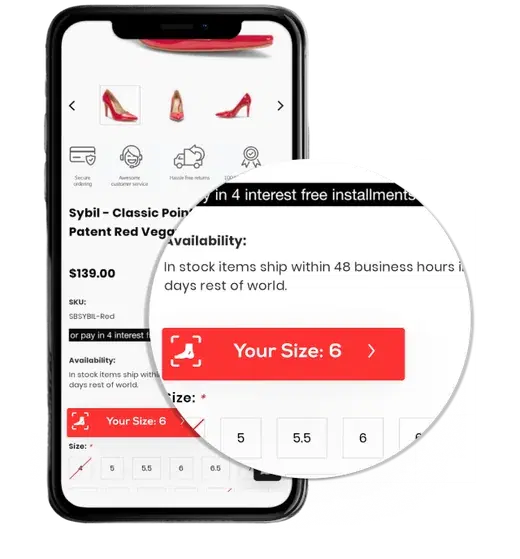
Click the button to find your size
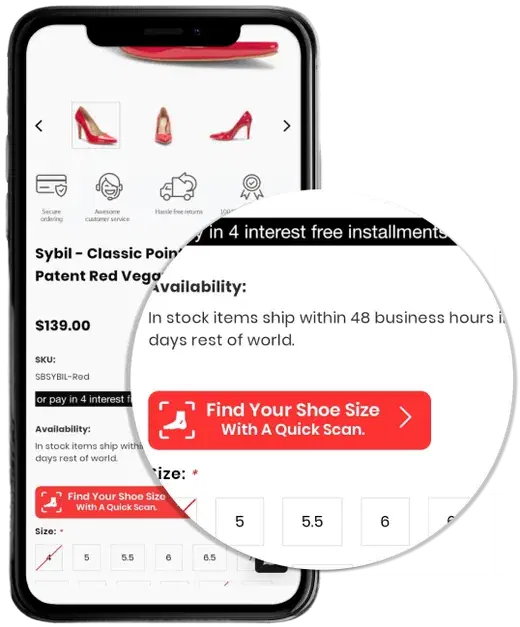
A “Find your size” button sits next to the size selector on each product page.
Take a quick scan
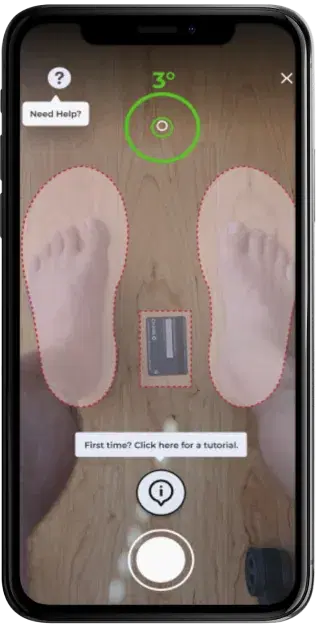
The shopper places a standard card for scale and scans from their phone camera. Guidance on screen keeps the angle right.
See your ideal size and measurements
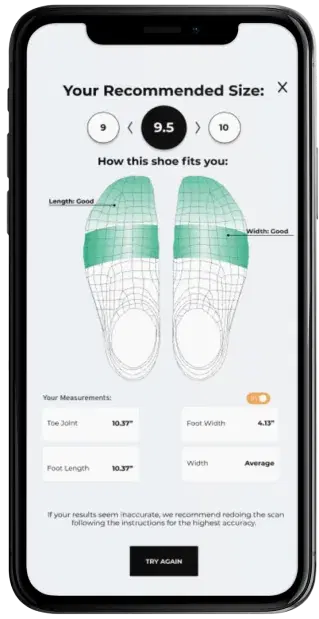
RealSize returns the recommended size for that style, how it fits across the foot, and the measurements behind it.
Buy the size that fits
The recommended size is pre-selected on the product page, so the shopper adds it to cart with confidence.
What the model reads
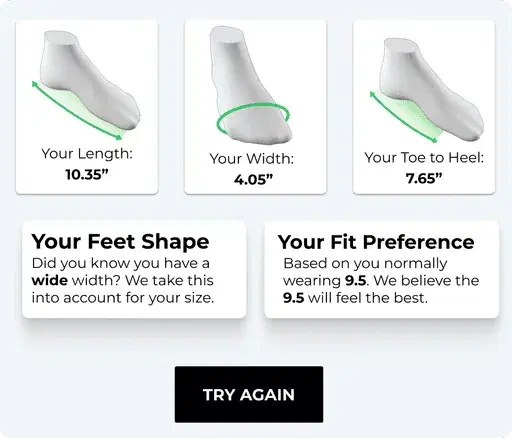
Every scan captures 18 foot measurements plus the shopper’s fit preference, then compares them against your size charts and lasts. Brands that run large or small get calibrated, not averaged.
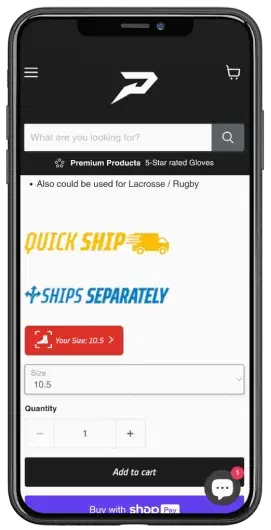
Footwear and gloves
One scanning flow covers shoes, boots, cleats, heels and gloves. Phenom used RealSize to learn their cleats ran larger than other brands, and the recommendations adjusted for it.
Merchant dashboard
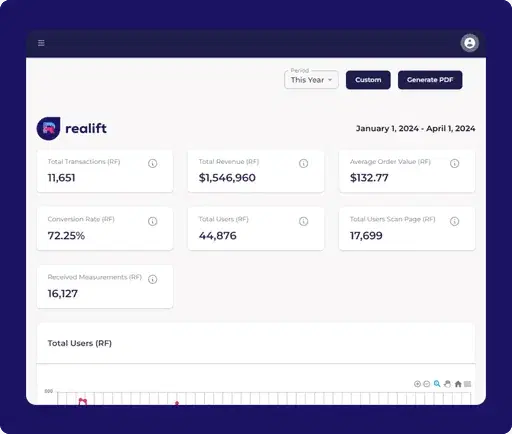
See usage, conversions, AOV and conversion rate from shoppers who scanned. Metrics come straight from your GA4 account, and you can find all of your analytics anytime in your ReaLift dashboard.
Integration
RealSize installs from the Shopify App Store. Our team handles size-chart calibration with you before launch.
RealSize for Shopify
Add scanning to your product pages without touching your theme code.
- Install the appAdd RealSize by ReaLift from the Shopify App Store.
- Calibrate your fitWe map your size charts and styles so recommendations match how each product fits.
- Go liveThe find-your-size button appears on product pages and results show in your dashboard.
Not on Shopify?
We work with custom and headless storefronts too. Tell us your platform and we’ll walk through the setup.
Contact usSee RealSize on your store.
Tell us about your brand and what you sell. We will show you how RealSize would work on your product pages.